

Today’s opening hours: Universitätsbibliothek: now closed · Teilbibliothek Mil: now closed · Teilbibliothek Jura: now closed


Do you have any other questions?
Please contact us:
by email: biblio(@)hsu-hh.de
by telephnoe 040 6541-3701
by Chat
Please use our Book Suggestions form (HSU memebers only).
You can find our printed books with their shelfmark, e.g. JUR 285:YD0012. The shelfmark indicates the exact location of a volume on the shelf.
If the locations “Handapparat” (Specific reference items) or “Sondermagazin” (Special collections stack) are displayed, please ask us for help.
The shelfmark indicates the exact location of a volume on the shelf and also contains a reference to the contents of the book. In the shelfmark JUR 285:YD0012 , JUR 285 refers to the subject „Higher Education Law/ Science Law“. The letter and number abbreviation in the example YD0012 sorts the books that deal with same subject area alphanumerically on the shelf.
Special components of shelfmarks
| Special component | Description |
| “S” after colon | Books with a shelfmark that has an “S” after a colon in the textbook collection and are available in large numbers. |
| “Z” after colon | The “Z” after a colon indicates that it is a journals. They have a separate location. |
| Person-related codes, e.g. SMI | Person-related codes are assigned if the content focusses on a specific person, e.g. Helmut Schmidt |
| Country codes, e.g. 2AA | Country codes are used if the content focusses on a specific country, e.g. Germany |
You can borrow media with your (valid) library card at the self-booking system in the university library and the branch libraries.
You can return borrowed media via self-booking system or, outside hours, by putting them in the book return boxes on the ground floor or 2nd floor (Building H1).
Media can also be returned to the library by post. Please note, however, that liability for books lost in the post lies with the borrower.
Journals: For journals, the loan period is 3 days for all users. There is no automatic renewing.
Books (monographs and textbooks):
| User groups | Loan periods |
| HSU students | 4 weeks, then up to 3 months grace period if no reservation has been made |
| HSU professors | 6 months, then up to 6 months grace period if no reservation has been made |
| HSU research associates | 4 weeks, then up to 11 months grace period if no reservation has been made |
| Non-HSU members | 4 weeks, then renewing is possible 3 times if no reservation has been made |
HSU members (incl. Gastrecht / right of hospitality):
All media will be automatically renewed to the maximum borrowing period or until reservation request has been received.
Non-HSU members:
In our catalogue, select the “Library account” button from the navigation bar at the top and enter the number of your library card and your password. In the Loans tab, you can then select the books that you wish to renew.
You can renew up to three times, provided the items have not been reserved.
There are some user groups that do not need to renew their loans and whose loan period carries on in a grace period.
The loan period for these user groups can be shortened if you make a reservation.
If you used HSUfind to look for a book, firstly click on the title you want or its shelfmark. You will be redirecte to the catalogue. There, scroll down and select “reserve”.
Log in:
The reserve or return notification is sent on the following day. The loan period then continues until the specified end date.
When the loan period has ended, the borrower has 5 days to return the book. This also applies during the grace period.
Most of these loans are trimester-specific reference items/documents. It is not possible to borrow or reserve these items/documents.
If you have lost any borrowed media, please fill out the form and hand it in at the library or send it to [email protected].
HSU members can sign the form digitally. To do so, you will need a valid user certificate.
Non-HSU members may also use the library on request and out of academic interest. You are welcome to bring further information and proof that you meet the requirement and fill out a request form for admission to use the library beforehand.
The library is located in a restricted military area. For this reason, please note the information on accessing the library.
Please let the library know immediately if you have lost your library card:
Your library card will then be suspended. You can request a new library card at the information desk during service hours.
A replacement card costs 5€ (processing fee), which you can pay using the vending machine in the canteen. Afterwards, please present your coupon at the library.
Please inform the library immediately if your address has changed. You will also need to show your ID card.
Your library account can be deleted provided you have not borrowed any media. In accordance with the General Data Protection Regulation, we regularly delete inactive library accounts.
HSU members:
Helmut Schmidt University students and employees receive their de-registration stamp at the university library (2nd floor), at the law library (2nd floor) and military library (ground floor).
Non-HSU members:
If you would like to deregister from using the library, please contact us in person, by e-mail to [email protected], by chat, or by telephone 040 6541-3701.
The university library provides access to over one million licensed electronic resources (e-books, e-journals, databases). Select your search entry via the Literature Search menu item.
Many scientific documents are not freely available online but have been purchased from the university library for a fee. You can only access these documents if you have a library account (remote access only possible for HSU members). However, publications published in Open Access can be used without registration.
Non-HSU members:
You can only open electronic media on site in the library. If required, however, you can download the PDF document, store it on an external medium, and then open the file from home.
HSU members:
HSU members outside the campus have two options for using our electronic media:
Many electronic resources enable you to identify yourself as a university member on a webiste with your RZ-Kennung (Computer Centre ID). Use the HSU login function to log in just once for all areas.
For more information and help with problems, see Accessing Electronic Media.
In principle, you have the choice between interlibrary loan and paid document delivery services.
With an interlibrary loan, you can order books or articles from other libraries provided they are not available in the Helmut Schmidt University library.
For a charge, you can make photocopies on the library’s multifunction devices.
Printing is only possible from the PC workstations in the library after logging in with your RZ-Kennung /Computing Centre ID (HSU members) or your library ID (non-HSU members). To print, select the “Q-Pilot” printer and then collect your printouts from any university multifunction device by placing your chip card on top of it.
Prices
The card top-up machine for printing and copying accepts coins to any amoint between 5 cents and 5 euros and issues change on request.
Opening hours
Universitätsbibliothek (University Library)
| Monday – Friday | 8:00 – 21:00 |
| Saturday – Sunday | 10:00 – 18:00 |
Service hours (University Library)
| Monday – Friday | 8:00 – 17:00 |
| Saturday – Sunday | Closed |
Please note: During service hours, the library is occupied by specialist staff. Outside service hours, only security staff are present. During these hours, no library cards can be issued and no specialist questions can be answered.
Teilbibliothek Mil (Military Library)
| Monday – Thursday | 9:00 – 16:00 |
| Friday | 9:00 – 14:00 |
| Saturday – Sunday | Closed |
Teilbibliothek Jura (Law Library)
| Monday | Closed |
| Tuesday – Thursday | 9:00 – 16:00 |
| Friday – Sunday | Closed |
You can change or delete your e-mail adress yourself (change e-mail adress).
| This search tool | enables you to… |
| HSUfind | search books, e-books, articles and more in the printed and online stock of the HSU Library. |
| Catalogue | search for specific printed and electronic books and journals. |
| Database Information System (DBIS) | find databases for your subject area. |
| Electronic Journals Library (EZB) | find journals available online. |
| For your subject area | find an introduction to research tools and databases. |
| Interlibrary Loan Catalogue of the GBV Common Library Network | search literature in other libraries and make an interlibrary loan request. |
| openHSU | find and retrieve full texts and research contributions by HSU members. |
| University bibliography | find independent and non-independent publications by university members from 1973 until 2024. |
| Helmut Schmidt Bibliography | Research 14,000 references to Helmut Schmidt as author or editor from 1947 onwards. |
Please schedule a research appoinment or contact the information desk during service hours.
Lockers:
Lock your documents in one of our lockers. These can be found in the University Library (2nd floor), in the Law Library (2nd floor) and Military Library (ground floor).
Rolling file cabinets:
You can use a mobile rolling file cabinet to lock your books or other items, e.g. at your desk. Please contact the information desk in the university library during service hours (2nd floor).
If you are a HSU student and have rented a desk, the desk comes with a rolling file cabinet.
By specific reference items/documents, we mean permanent loans from professorships.
HSU members can view the media included wih thes reference items/documents. To do this, check the list of reference items/documents and contact their holder. Using the number specified in the catalogue, you can look up to see from which professorship the books have been borrowed.
It is not possible to reserve these media.
Trimester-specific reference items/documents are put together by HSU lecturers with the literature recommended for a particular lecture or a seminar. Students can use electronic media online and printed media on site in the library.
You will find the trimester-specific reference items/documents opposite the information desk in the entrance area of the university library (2nd floor).
The textbook collection encompasses media that are recommended in lectures and seminars. They are available in large numbers. It is located in the Economics and Social Sciences 1 area (2nd floor).
Please note that there is one copy per title that is not available for loan. This copy is labelled with an “N” on the spine.
These are closed areas that can only be accessed by library staff.
This bibliography is the largest collection of Helmut Schmidt’s works, containing almost 10,000 references to works he worte or edited from 1947 onwards.
You can do a literature search online in the bibliography.
The University bibliography contains all publications that were created in connection with an activity at Helmut Schmidt University.
The printed media are available in a dedicated area in the Military Library (ground floor). It is not possible to borrow these items.
Due to lack of space, journals published before 1980 are not freely accessible. The journal volumes from the areas mechanical engineering/electrical engineering are not freely accessible.
Please use the magazine order form.
Technical accessories
HSU members can borrow an external monitor, including connection cable, to work in the library (loan period: 1-14 days).
It can be reserved with Anny (login in with SSO login and Computing Centre ID).
You can borrow over-ear headphones at the information desk (University Library, 2nd floor). As a deposit, you are asked to leave your student ID card at the information desk (University Library, 2nd floor).
There is a Microsoft hub in the respective group workrooms on the 1st floor of the University Library Using Microsoft Teams, you can connect to the monitor with your mobile phone, tablet, or laptop. The camera and pen for this system can be borrowed at the information desk (University Library, 2nd floor). As a deposit, you are asked to leave your student ID card or libray card.
For microfilms and microfisches: 1 Canon 35 microform scanner
The device is located behind the help desk on the 2nd floor of the University Library. Please ask at the information desk what functions are possible.
USB sticks can be borrowed at the information desk through your library account.
You can borrowed pens at the information desk (University Library, 2nd floor). As a deposit, your are asked to leave your student ID card or library card. The whiteboards are located in the respective group workrooms on the 1st floor of the university library.
If you are a member of a university that participates in the eduroam initiative, you can use the eduroam WLAN with you own notebook, tablet or smartphone to go on the Internet.
All other users can use the FreeHSU WLAN.
The hsu2019 WLAN is availabe throughout the university campus. You can dial into it with your Computing Centre ID.
Outside the campus, you can also access the network (including our e-resources) from home or from other remote locations via the VPN connection.
The library is located on the campus of the Helmut Schmidt University/Bundeswehr University Hamburg. This is a restricted military area and is therefore subject to entry control. Before you enter, the guard will ask you to show your library card and photo ID.
If you do not have a library card yet, please inform the guard that you wish to use the library (registration). You can then enter the campus during the library service hours.
All three libraries are in Building H1:
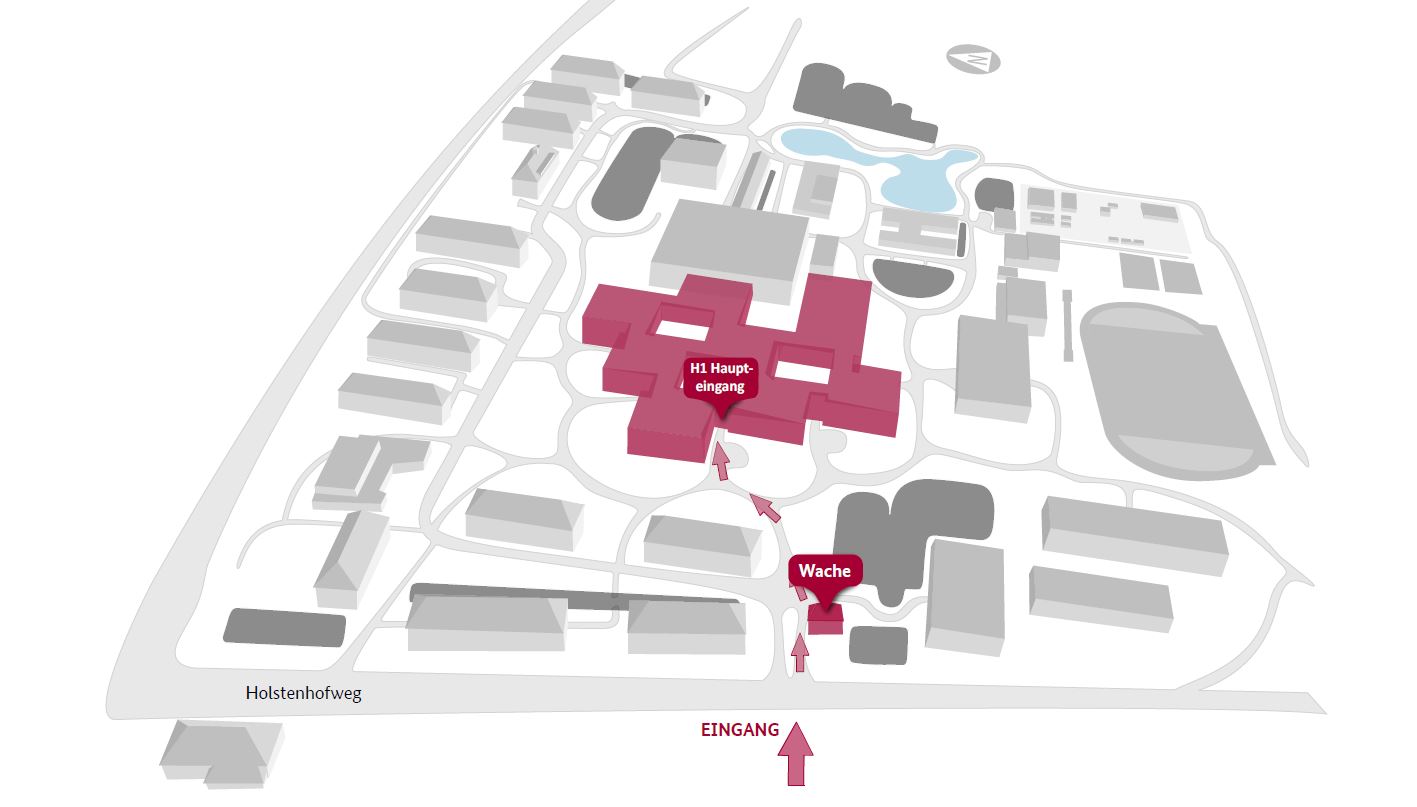
The library has three locations in Building H1. You can find the libraries by using the signs in the building or our directions (site maps) :